Dots connected. Integrity assured.

ENGAGE is a data intelligence platform built around asset integrity, connecting asset data with integrity decisions from risk-based inspection through workpacks, inspection and anomaly management to analysis.

Explore the modules
About ENGAGE

Developed by integrity professionals, for integrity professionals.

ENGAGE was built by CAN Group's own asset integrity specialists to close the gap between inspection data and integrity decisions. It brings the full lifecycle, from risk-based inspection through workpacks, inspection and anomaly management to analysis, into one system, giving operators a single, trusted source of truth for their assets.

Meet TEQ

Ask your asset.

TEQ is the AI assistant built into ENGAGE. Ask a question in plain English and get an answer drawn from your own integrity records, with links straight to the items, anomalies, workpacks and RBIs behind it.

TEQ works agentically: it decides which parts of ENGAGE to search, runs the lookups itself and brings back one answer with links to the records behind it. It never changes your data.

Engineers ask things like:

  • What inspections are overdue this month?
  • Which lines are closest to MAWT?
  • Summarise the RBI for this circuit
  • Which temporary repairs expire in the next 90 days?
  • Who has the most outstanding anomaly actions?
  • Find the P&IDs for this line
Illustrative example. TEQ answers from your own ENGAGE records.

Answers from your data

Every answer is built from your ENGAGE records, not the internet, and links back to the source so you can check it.

Sees only what you can see

TEQ follows your ENGAGE permissions and active site, so it never surfaces a record you couldn't open yourself.

Informs, never decides

TEQ is read-only. It finds, summarises and explains; your engineers make the integrity decisions.

Your day, summarised

A dashboard summary of what needs your attention today: overdue actions, workpacks awaiting approval and repairs nearing expiry.

Try TEQ right now

The assistant on this website runs on the same TEQ engine. Here it answers from this site rather than your asset data, so ask it anything about ENGAGE: modules, security, TEQ itself or how to book a demo.

TEQ works because ENGAGE already holds integrity data at the right depth: pipe classes and design codes behind every MAWT, readings at CML level, and the whole lifecycle from RBI to repair in one system.

The platform

One system. Every dot in the integrity process.

Every module works from the same asset record, from the register and RBI through workpacks and inspection to anomalies and repairs.

  • Hub

    The asset register for every item class, from pipework and pressure vessels to PSVs, tanks, flexible hoses and small bore tubing, with circuits, CMLs, deadlegs and full reading history.

  • Dashboard

    Over 50 configurable widgets in drag-and-drop layouts, from anomaly heatmaps to inspection plan attainment, with charts that click through to the records behind them.

  • RBI

    Risk-based inspection using configurable probability and consequence scoring, setting inspection frequencies you can override with a recorded justification.

  • Digital Workpacks

    Define the scope of work, manage approval workflows and issue workpacks with marked-up drawings, then carry them out offline in the field on the CANtab™ tablet app.

  • Inspection

    Capture inspections against configurable inspection types and question sets, with geotagged photos, review and approval workflows, and issued reports.

  • Anomaly Management

    Manage anomalies, potential anomalies and weeps, seeps and leaks through configurable workflows, with a DLR Register for temporary repairs and mitigations.

  • Document Library

    Drawings and documents linked to the items they describe, with version history, drawing markups and search inside the drawings themselves.

  • Preventative Maintenance

    Fabric maintenance, find-and-fix and CUI registers, raised in the field and tracked through to completion.

  • AI and Machine Learning

    TEQ, the built-in AI assistant, answers questions from your live ENGAGE data, while machine-learning text recognition indexes legacy and scanned drawings to find tags and suggest links to your asset register.

Covers every asset class you manage

  • Pipework
  • Pipelines and subsea
  • Pressure vessels
  • Structures
  • Pressure safety valves
  • Tanks
  • Valves
  • Special equipment
  • Flexible hoses
  • Small bore tubing
  • Corrosion circuits
  • Deadlegs
Inside ENGAGE

See the whole picture. Then act on it.

The tools integrity teams use every day, built on the same data and linked to the same records.

Hub

One register for every asset type

The Hub is the central register for everything you maintain, from pipework and pressure vessels to PSVs, tanks, flexible hoses and small bore tubing, as well as structures, subsea and more. Search it and you are on the record.

  • Every asset class in one register, organised into circuits, CMLs and deadlegs
  • Search by tag, line, circuit or description and go straight to the item
  • Design data, readings, anomalies, drawings and documents on the same record
  • Saved views, grouping and per-column filters so your team sees its own slice
Find out more One register for every asset type →

Search every asset, circuit, CML or tag SEARCH Pipework Vessels Subsea Structures PSVs Tanks Hoses Small bore HUB One asset register ITEM 10"-PW-1001
Dashboards

From overview to record in one click

Over 50 configurable widgets in drag-and-drop layouts, with charts that click through to the records behind them.

  • Drag-and-drop layouts, several per user
  • Current Risk Position: open anomalies on your own risk matrix
  • Anomaly Ageing and burn-down trends
  • Inspection Plan Attainment and Today's TEQ Summary

Find out more From overview to record in one click →

Planner Board

Reschedule a whole circuit in one move

A drag-and-drop board built from your RBI inspection frequencies, with an Overdue column and a column for every month ahead.

  • Swimlanes by corrosion circuit, system, service or module
  • Roll a pipework circuit of hundreds of items into one card
  • Every move needs a justification, is audit logged and is limited to authorised users
  • A Workpack Board shows every workpack's stage, from creation to close-out

Find out more Reschedule a whole circuit in one move →

OVERDUE 2026-10 2026-11 2026-12 CIRCUIT PW-05 412 items Justification required
Drawing markups

Your results on the drawings

CMLs, test points and line routes marked up on P&IDs, isometrics and GA drawings, opened straight from the item, circuit, anomaly or workpack.

  • Mark up in the browser: draw a ring or trace a line, no CAD needed
  • Colour by wall thickness, open anomalies, inspections due or workpack scope
  • Export a marked-up PDF, with legend and revision, for the field team
  • Import existing markup from legacy drawing sets

Find out more Your results on the drawings →

CML T3 · BREACH 5.1 mm vs MAWT 5.4 mm OK WARNING ALARM BREACH
3D visualisation

Step inside the asset

Open 3D models and reality-capture scans of your plant from the item record, next to its drawings, readings and anomalies. ENGAGE works with the 3D platforms you already use, rather than replacing them.

  • 3D model viewer built into every item record
  • Viewer plugins for NIRA, Sketchfab and digital twin platforms such as Envizion AVA
  • The viewer is role boxed: only users with the right role can open a model

Find out more Step inside the asset →

ANOMALY A-1042 External corrosion 3D
Engineering depth

Real calculations, not best guesses

Remaining life is only as good as the numbers behind it. ENGAGE holds the pipe classes, material specifications and design codes for your plant and does the calculation itself, three ways.

  • MAWT calculated from the pipe class, from design values and from operating values
  • Alarm thicknesses from a choice of formulas, including API 574 alert thickness
  • Historic and present corrosion rates, each projected to the date a CML reaches MAWT
  • Wall thickness trend charts across multiple CMLs

Find out more Real calculations, not best guesses →

8.0 7.0 6.0 5.0 WT mm ALARM 6.2 MAWT 5.4 2016 2026 2036 2029 2033 present rate historic rate
Defined-life repairs

A DLR Register that keeps repairs honest

Track every temporary repair and mitigation from approval to expiry, so nothing quietly outlives its design life.

  • Validity and re-inspection periods set per repair category
  • Early warning before a repair expires, with revalidation built in
  • A repair approval matrix routes each repair to the right approver
  • Dashboard views of repairs in force and approaching expiry

Find out more A DLR Register that keeps repairs honest →

Today Clamp Wrap Sleeve Clamp Expires soon
Drawing indexer and Tag Finder

Turn a legacy document dump into connected asset data

Import years of unorganised drawings and PDF reports into the Document Library. ENGAGE indexes every sheet in the background, using machine-learning text recognition to read scanned drawings, including tags inside instrument bubbles and rotated text.

  • Search a tag across the whole library, tolerant of common scanning misreads
  • Suggested drawing-to-item links for an engineer to review and accept
  • Tag Finder shows exactly where a tag sits on the sheet
  • TEQ can search and read the indexed drawings

Find out more Turn a legacy document dump into connected asset data →

PSV-2104 1,284 SHEETS SEARCHED P&ID D-2100-004 rev C Exact match · scanned sheet · page 1 LINK TO PSV-2104 GA V-2104-GA-01 rev B Exact match · text layer · page 2 LINK TO PSV-2104 Report 1998 PSV survey (scan) Read as PSV-21O4 · likely misread VERIFY
CANtab tablet app

No signal? No problem.

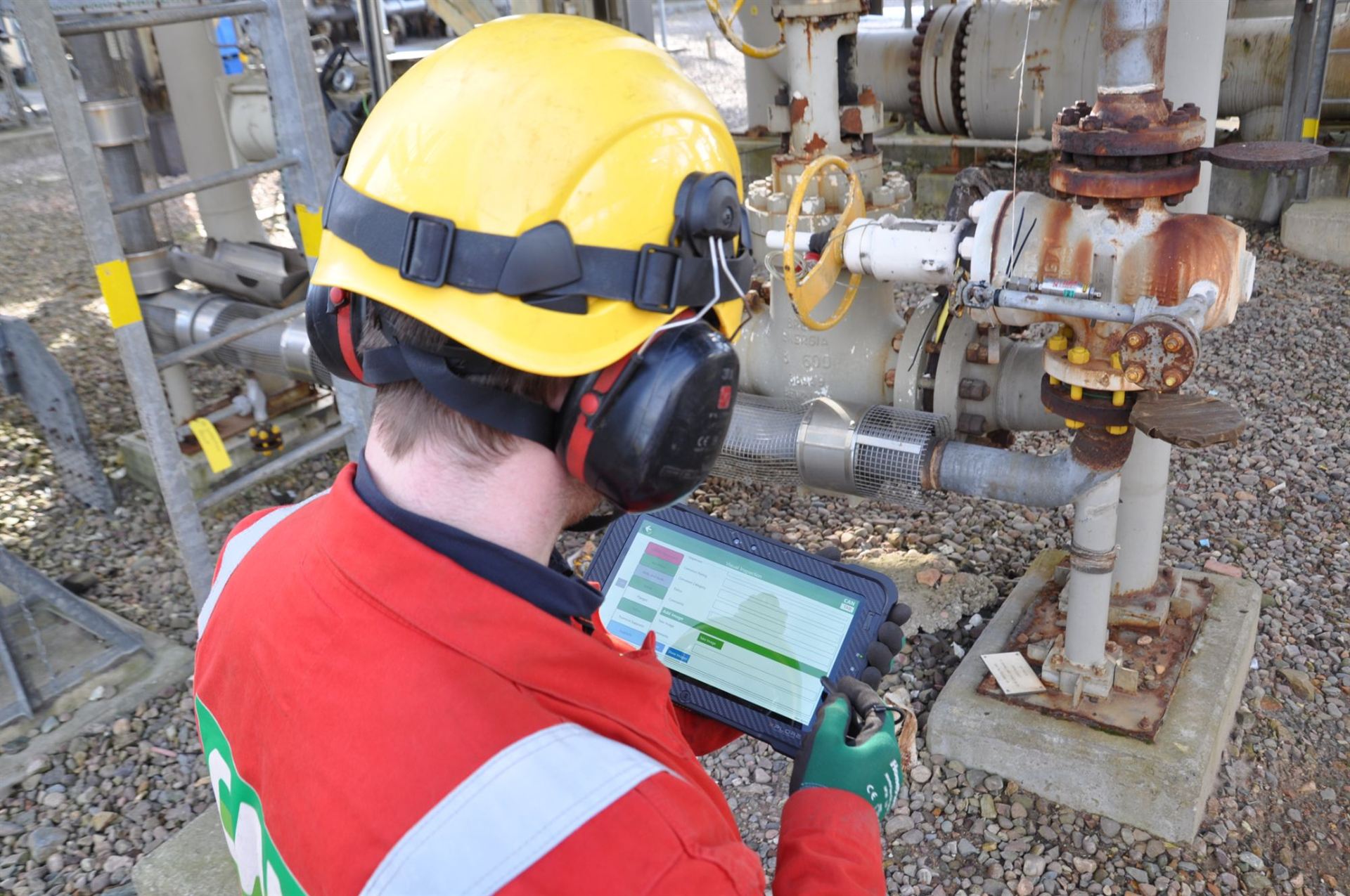
The workpack goes offshore on the tablet. Inspectors record results without a connection, and ENGAGE takes them through review and approval once back in range.

  • UT readings against each CML, with MAWT on screen
  • Visual inspections, line walks and question sets
  • Raise anomalies, CUI, find-and-fix and FM items
  • Geotagged photos, drawings and PDFs on the device

Find out more No signal? No problem. →

Inspector recording a visual inspection on CANtab beside process pipework
  • 27 sites managed in ENGAGE
  • 115,000+ equipment items under management
  • 575+ integrity professionals using ENGAGE
  • 345,000+ inspections completed, from workpack to approval

An average of nearly 12,800 inspections and more than 4,250 equipment items for every site: deep, well-used records rather than light deployments.

Why ENGAGE

What integrity teams get from ENGAGE.

Audit-ready, every day

Every inspection, anomaly, repair and date change is recorded against the asset with who, when and why, so evidence for auditors and regulators is always to hand.

Inspect where the risk is

RBI-driven inspection frequencies and a visual planning board focus effort on the assets that need it, with every interval change justified and traceable.

Close anomalies out

Clear ownership of actions, reminders and live dashboards of what is outstanding and overdue keep anomalies moving from report to close-out.

Replace the spreadsheets

One system of record from RBI to repair, shared by engineers, inspectors and contractors, instead of disconnected spreadsheets and legacy databases.

Data intelligence for asset integrity

What is asset integrity management software?

Asset integrity management (AIM) software is the system of record for keeping plant, pipework, vessels and structures safe to operate. It holds the asset register and design data, plans risk-based inspection (RBI), captures inspection results, and tracks anomalies and repairs through to close-out.

ENGAGE is a data intelligence platform built around asset integrity. It brings all of that into one system built by integrity engineers, so every inspection, CML reading, anomaly and defined-life repair sits against the asset it belongs to, ready for audit and ready to act on.

Frequently asked questions

What is ENGAGE?

ENGAGE is a data intelligence platform built around asset integrity, developed by CAN Group's own integrity specialists. It covers the full lifecycle in one system: the asset register, risk-based inspection (RBI), digital workpacks, inspection data, anomaly management and the DLR Register, with TEQ, an AI assistant, built in.

Can ENGAGE integrate with our other systems?

Yes. ENGAGE has a REST API for integrating with external systems.

Bulk Excel import and export, with templates and a simulate option to check a load before it is committed, covers items, circuits, anomalies, repairs, inspections, pipe classes and more.

Does ENGAGE support single sign-on?

Yes. Users can sign in with their Microsoft Entra ID work accounts, so your organisation's own multi-factor authentication and access policies apply.

Username and password sign-in is also available, with two-factor authentication by authenticator app, SMS or email.

How is our data kept secure?

ENGAGE runs on Microsoft Azure. Access is controlled by role and by site, so users only see the sites and records they are entitled to, changes are audit logged at field level, and accounts lock after repeated failed sign-ins.

CAN Group is Cyber Essentials certified and a member of the Microsoft Partner Network.

What is TEQ, and does it make decisions?

TEQ is the AI assistant built into ENGAGE. Ask it a question in plain English and it answers from your own ENGAGE records, with links to the items, anomalies, workpacks and RBIs behind the answer.

TEQ is read-only and follows each user's permissions and site. It helps engineers find and understand information; it does not make integrity decisions.

Can inspectors work offline?

Yes. The CANtab tablet app downloads workpacks from ENGAGE, lets inspectors record UT readings, visual inspections, observations and geotagged photos without a connection, and uploads the results for review and approval once back online.

Which assets does ENGAGE cover?

Pipework, pipelines and subsea, pressure vessels, structures, pressure safety valves, tanks, valves, special equipment, flexible hoses and small bore tubing, organised into circuits with CMLs and deadlegs. Inspection types and question sets are configured to match your own inspection philosophy.

Can ENGAGE be configured to our processes?

Yes, without a development project. Terminology, approval workflows, inspection types, question sets, risk matrices, alarm thresholds, dashboards and saved views are all configured within ENGAGE.

Can we bring our existing data into ENGAGE?

Yes. Excel import templates load your asset register, inspection history, anomalies and repairs, and CAN Group has successfully migrated customers from many other integrity systems, both modern and legacy, including their drawings, multimedia and all inspection history, ensuring continuity.

Release notes

What's new in ENGAGE

Let's connect the dots

Smarter integrity management starts with a conversation.

Download the brochure